A pie-chart gives a clear visual impression of the size of a set of data inside a circle.
Since each section of data is clearly marked in a distinct colour, it is a powerful way of showing
the size of data.
E.g. Suppose that the marks obtained by a student in a school test is as follows:
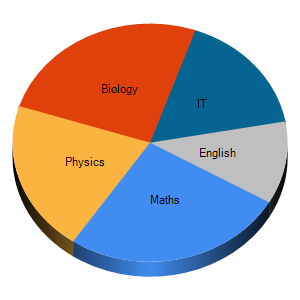
Enter the above values and click the Draw button.
Now, in order to explain the data in the pie chart, we can use the following simple
procedure:
The total of marks is 240.
240 marks 3600
1 mark 360 /240 = 1.5 0
Based on this, the size of pie for each subject , in proportion to each mark, is as
follows:
|
Subject |
Size of the Pie in degrees |
|
Maths |
105 |
|
Physics |
90 |
|
Economics |
60 |
|
IT |
75 |
|
Geography |
30 |
You can see that the angles in the table tally the relative size of each slice.
After learning the given example, you can enter your own values into the table that is next to the pie chart and experiment with it.